
Physical cards
A physical card is more than a payment instrument — it's the most tangible expression of your brand in your customer's wallet. Vrtx handles the entire journey from the moment a customer requests a card to the moment they tap it at a terminal.
Production, personalization, compliance review, fulfillment, shipping, and activation are all managed through Vrtx. Your team integrates once via the SDK. Everything else is handled.
Part of the cards suite
Physical cards work alongside virtual cards, the card lifecycle engine, and tokenization. If you haven't read those sections yet, start with Virtual cards for context on how cards are structured before a physical form factor is introduced.
Card specifications
Vrtx issues standard CR80 cards — the same dimensions used by every major payment network globally. This ensures compatibility with all point-of-sale terminals, ATMs, and card readers, whether your customers are spending in Riyadh or anywhere else in the world.
Front of card
Fully customisable to reflect your brand — logo, colour, imagery, and typography. Must include the Visa logo, an EMV chip, and the contactless payment indicator, all positioned per Visa network guidelines.
Back of card
Standardised for compliance. Must include the magnetic stripe, signature panel, CVV2, and regulatory disclosures — issuing bank details and customer service information. Layout must maintain readability without compromising security requirements.
Local routing (KSA)
Cards must accommodate Saudi Arabia's co-badging requirements for transactions routed through the national payment network. This includes correct placement of domestic scheme marks and compliance with local network specifications.
Pre-production approval required
All card artwork, materials, and production assets are reviewed against Visa brand standards and regulatory requirements before manufacturing begins. Vrtx conducts this review on your behalf. Submitting assets early reduces the risk of delays and avoids reissuance costs.
Issuing and shipping a physical card
Customers can upgrade from a virtual card to a physical card directly inside your app. The entire lifecycle — request, fulfillment, shipping, and activation — is managed through the Vrtx SDK with no external integrations required.
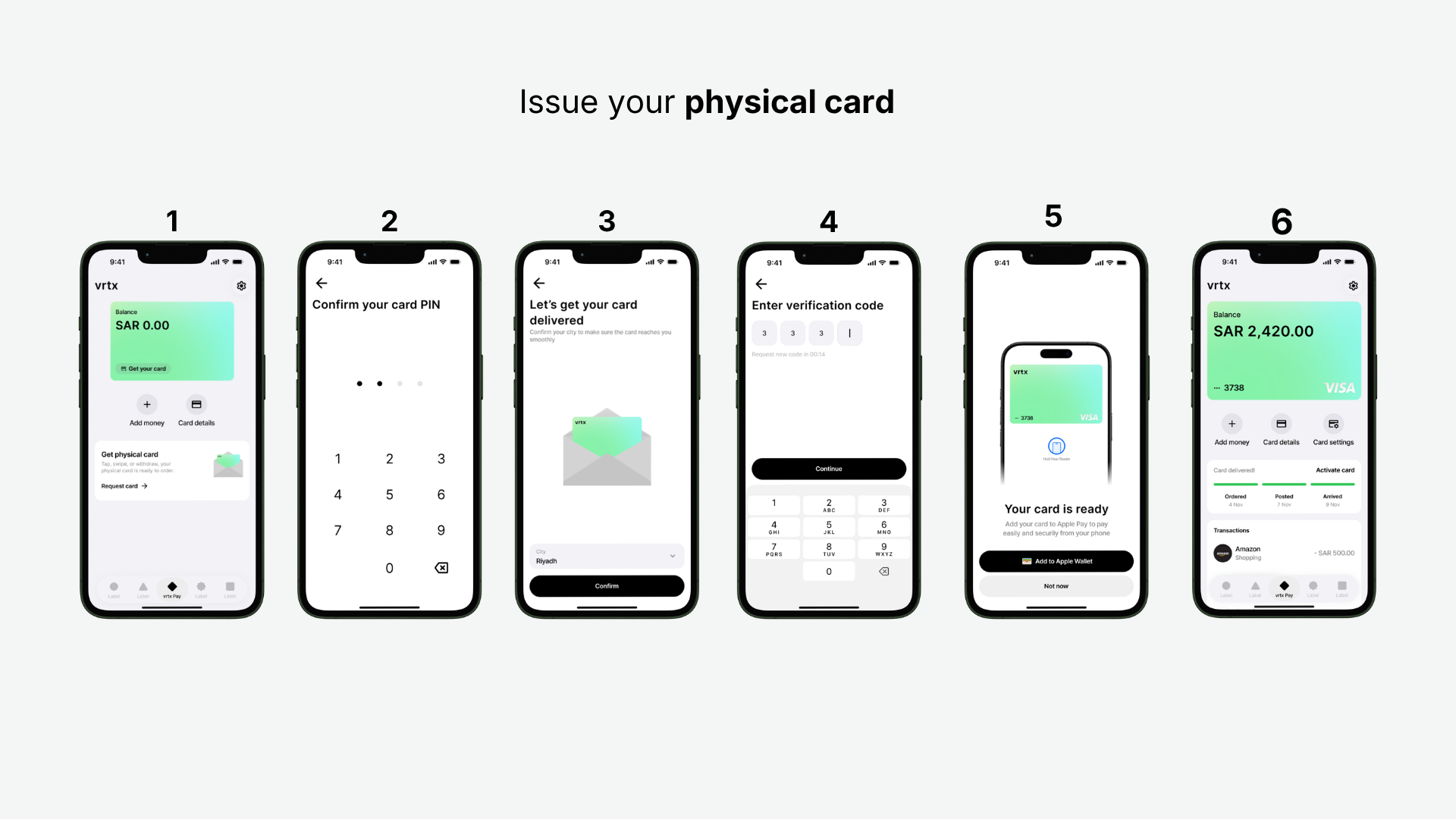
Customer requests the card
The customer initiates a physical card request from their wallet dashboard inside your app. Vrtx validates eligibility against the card lifecycle state and queues the card for production.
Shipping address collected
Before fulfillment begins, the customer's delivery address is captured. This is the only input your app needs to provide — Vrtx handles everything downstream from here.
Tracking, delivery & activation
Real-time shipping status is available throughout delivery. Once the card arrives, the customer is prompted to activate it directly in your app — securely linking the physical card to their wallet.
Shipping states
Every physical card order moves through a clear set of states from production to delivery. Surface these in your app to keep customers informed at every step.
| State | What it means |
|---|---|
PENDING | The card request has been received and queued for manufacturing. Production has not yet started. |
POSTED | The card has completed production and been handed to the courier. A tracking number is generated and available. |
DELIVERED | The courier has confirmed delivery to the cardholder's address. The activation prompt is now shown to the customer. |
Activating a physical card
Once the card is delivered, the customer activates it directly inside your app in three steps. Activation uses NFC — the customer simply taps their card against the back of their phone. No card number entry, no call centre, no friction.
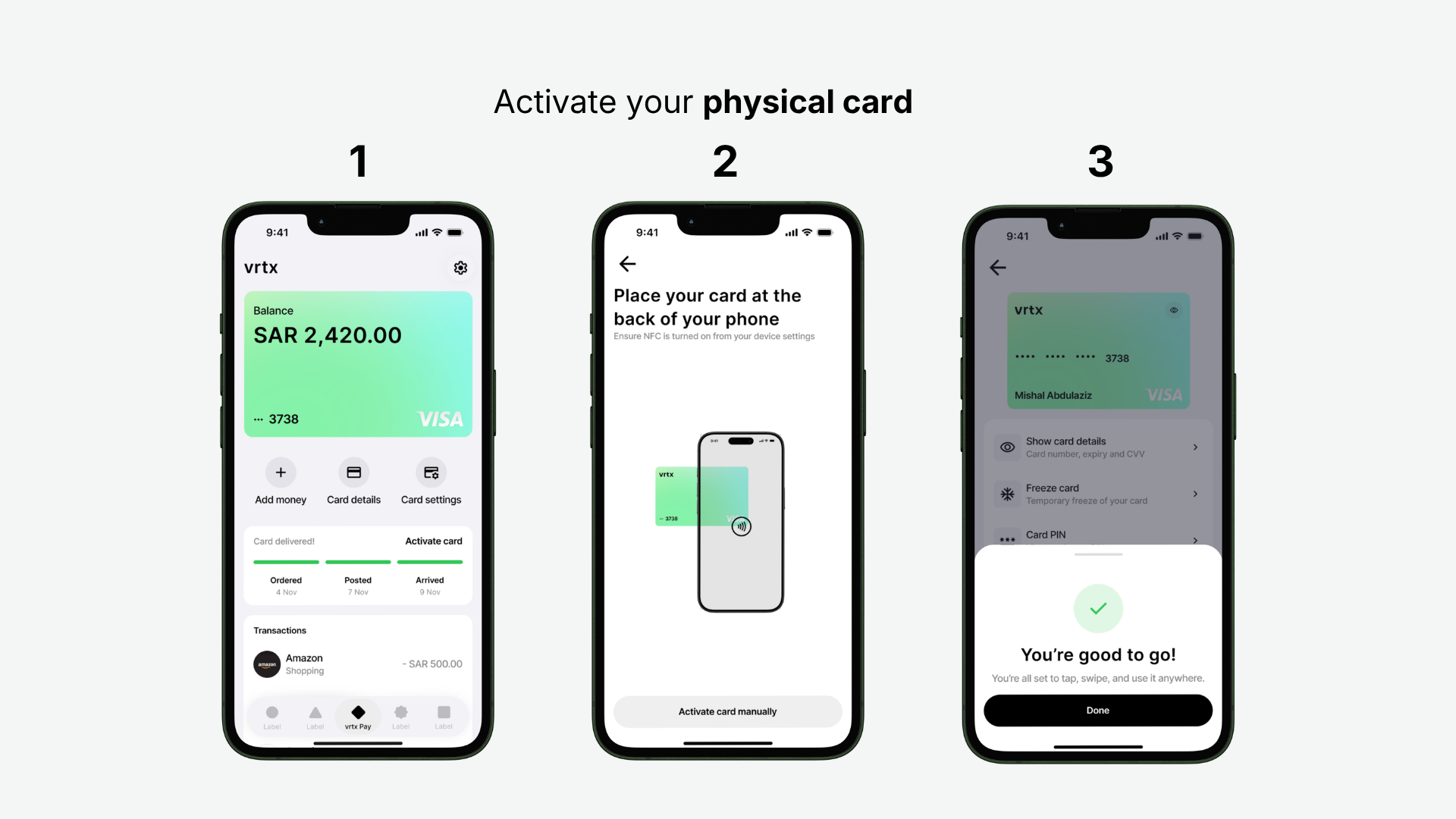
Tap 'Activate card'
When the card status reaches DELIVERED, a prominent activation prompt appears on the customer's wallet dashboard. The shipping timeline — Ordered, Posted, Arrived — is visible inline so the customer always knows where their card is.
Tap card to phone
The customer places their physical card against the back of their phone. NFC reads the card and completes the pairing instantly. For devices where NFC isn't available or enabled, a manual activation fallback is also surfaced on this screen.
Card is live
Activation is confirmed and the card is immediately ready to tap, swipe, and use anywhere. The customer lands on their card management screen — with access to card details, freeze controls, and PIN management — all in one place.
Manual activation fallback
If a customer's device doesn't support NFC or has it disabled, an "Activate card manually" option is available on the NFC screen. This presents an alternative flow that does not require a physical tap. Vrtx handles both paths through the same SDK integration — no extra work required on your side.
Post-activation card controls
Once activated, the customer has immediate access to full card management directly in your app — show card details (number, expiry, CVV), freeze and unfreeze the card, and set or change their card PIN. All controls are available through the Vrtx SDK.
Packaging & branding
Your card doesn't just arrive — it arrives in packaging that represents your brand. Vrtx uses a standardised envelope format for all physical card fulfillment, with defined zones where your brand identity can be applied.
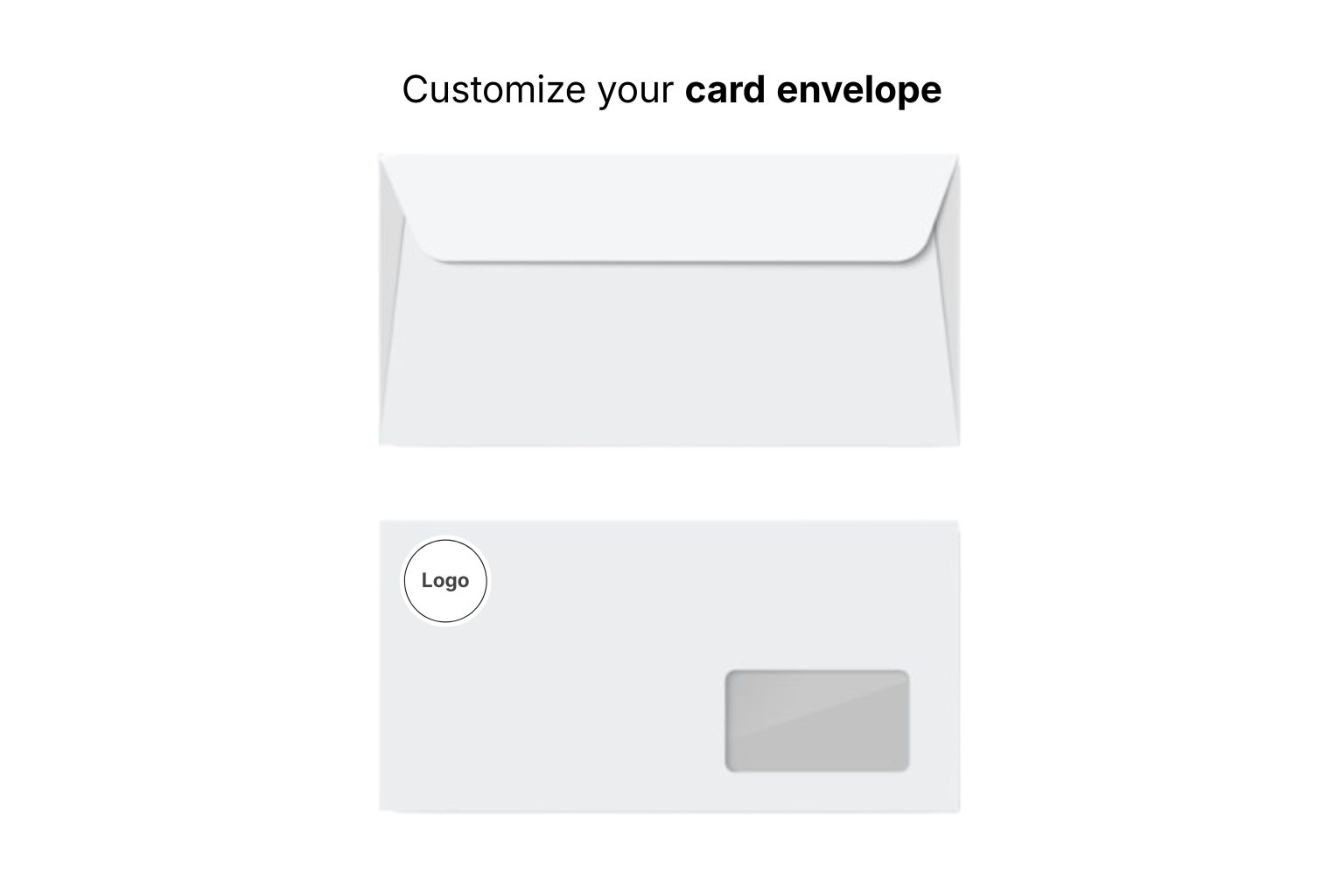
Envelope structure
Standard white rectangular envelope with a secure back flap closure. The recipient's address is printed on the internal card carrier letter and visible through a clear window positioned in the bottom right corner — kept clear for postal barcode scanning and automated routing.
Brand placement
Your company logo can be placed in the top left corner of the envelope's front face. This ensures customers recognise the delivery as coming from your product before they even open it.
Design submission requirements
To avoid print delays, follow these requirements when submitting packaging assets:
- Provide logo files in vector format (SVG or EPS) for crisp printing at any size
- Use CMYK colour profiles — RGB files will produce unexpected colour shifts in print
- Keep the bottom right address window completely clear of any design elements — postal services require this zone for barcode scanning
Ready to go further?
Virtual cards
Understand how virtual cards work and how physical cards extend the same underlying card record.
Card lifecycle
See every state a card can be in — from issued through to terminated — and how transitions are triggered.
Tokenization
How physical and virtual cards are tokenized for Apple Pay, Google Pay, and Samsung Pay.